Arabic Document Processing: How AI Reads Invoices, Forms and Contracts in the UAE
By AI Meets Real teamPublished 5 min read
Key takeaways
Modern AI reads printed Arabic well, including bilingual Arabic and English documents; handwriting and poor scans still need checks.
Good document processing has three parts: reading the text, extracting the fields you need, and checking them against rules and your own records.
A person should review low-confidence fields and anything that moves money or changes a legal record.
Start with one document type, measure accuracy field by field, and only then widen the scope.
Arabic document processing means using AI to read Arabic and bilingual documents, pull out the information you need, check it and send it to your systems. Modern AI reads clear, printed Arabic well, including documents that mix Arabic and English on the same page. Handwriting, stamps over text and poor scans still need a person to check. The value comes from the checks, not just the reading.
Why is this a bigger job in the UAE?
Most UAE companies deal with paperwork in two languages. Supplier invoices, trade licences, tenancy contracts, government letters and customs papers can arrive in Arabic, in English or in both. Many teams still type this information into their systems by hand, which is slow and creates errors that show up later in payments, renewals and reports.
The volume is also rising. The UAE is moving to electronic invoicing, starting with large businesses in 2027 (KPMG), but suppliers, landlords and government entities will keep sending PDFs and scans for years. A reliable way to read them is still needed.
How does AI read an Arabic document?
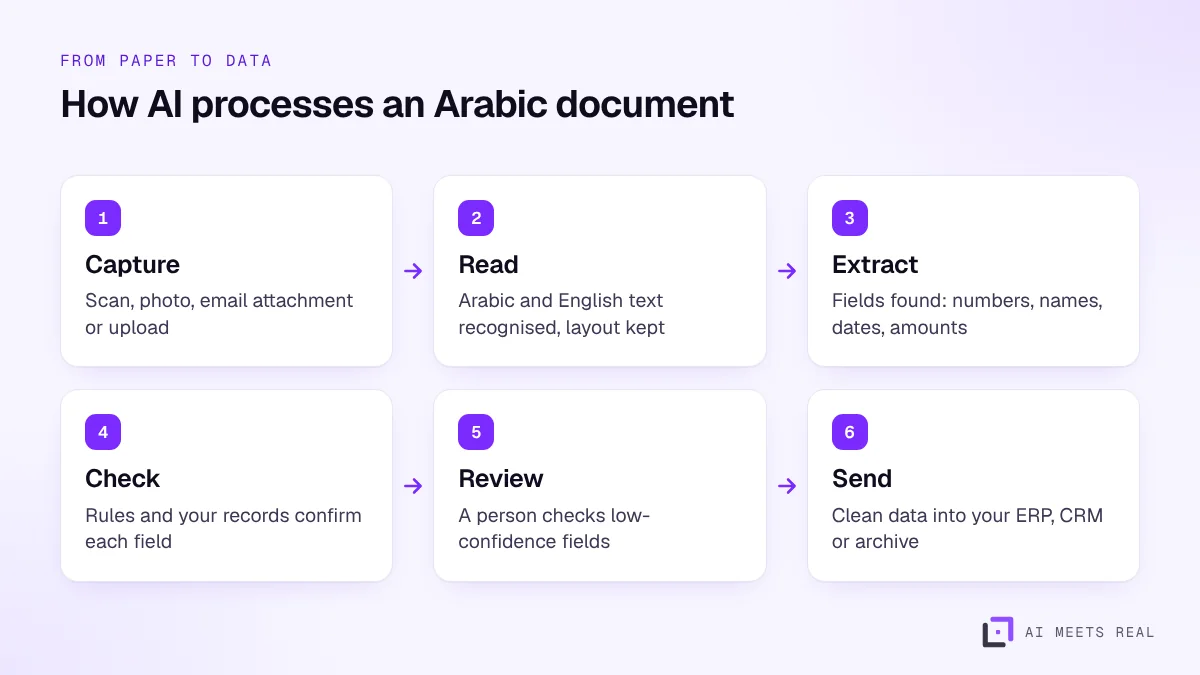
Document processing has three parts.
Reading the text (OCR). The AI turns the image into text and keeps the layout, so it knows which words belong to which box or table. Major cloud services list printed Arabic as supported; Microsoft's documentation, for example, lists Arabic for printed text but not in its handwritten list (Microsoft Learn).
Extracting the fields. A language model finds the fields you care about, such as the supplier name, tax registration number, invoice date and total, even when every supplier uses a different layout.
Checking the result. Rules and your own records confirm each field: the TRN has the right format, the totals add up, the supplier exists in your ERP, the expiry date is in the future.
Reading the text is only the first step; the checks are what make the data safe to use.
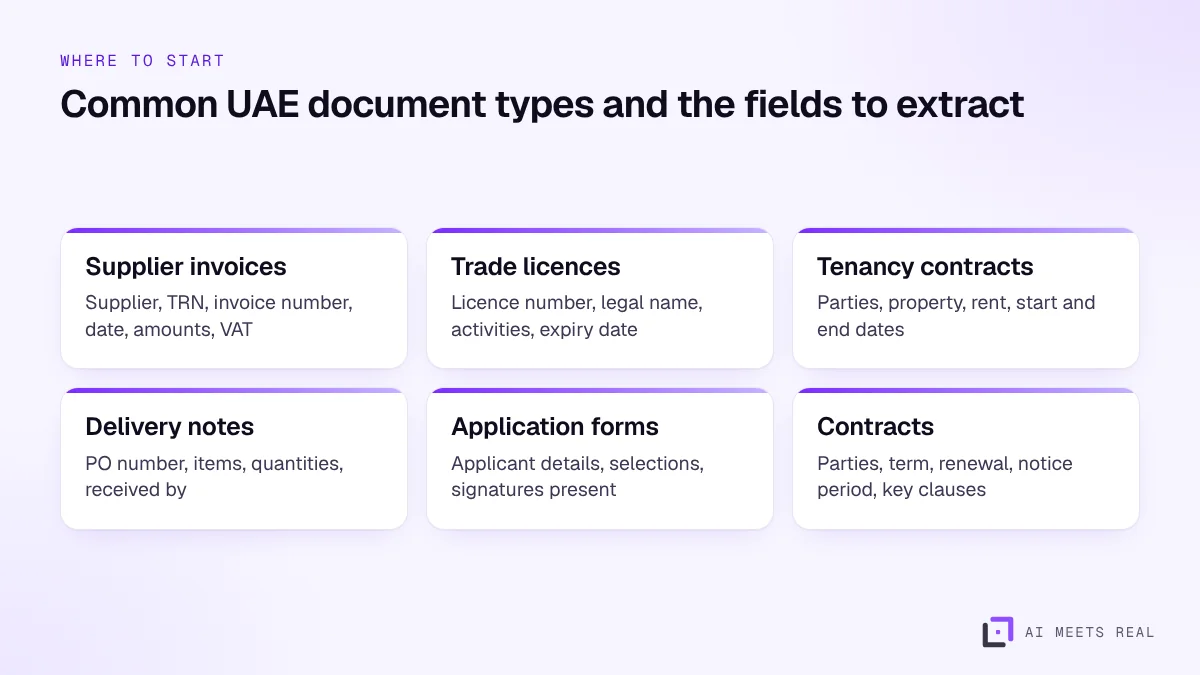
Start with a document type that arrives often, has a clear set of fields and causes problems when it is wrong.
Each document type gets its own field list and its own checks.
Supplier invoices are the most common first choice because errors cost money and the fields are well defined. Trade licences and contracts are good second choices because missed expiry and renewal dates are expensive. Our guide to procurement automation shows how invoice data connects to purchase orders.
What accuracy should you expect?
Accuracy depends on the document, not just the AI. Expect very good results on clean, printed, digital PDFs; good results on clear scans; and weaker results on phone photos, faxes, stamps and handwriting.
Measure it properly:
Field by field, not document by document. A document with nine correct fields and a wrong total is not a success.
On your own documents, with a sample of at least 50 from different senders.
Against a person's answer, so you know the real error rate before you switch off manual entry.
Then set confidence thresholds. Fields the AI is sure about pass straight through; uncertain ones go to a person. Over time the share needing review usually falls as you add rules and examples.
Where should a person stay involved?
Keep a person reviewing:
Any field below the confidence threshold.
Anything that moves money, such as bank details or payment amounts that differ from the purchase order.
Changes to legal records, such as a new licence holder or a changed contract term.
Handwritten documents and documents with stamps or signatures over key text.
The reviewer sees the document and the extracted fields side by side and corrects only what is wrong. Every correction is logged, which also gives you an audit trail.
How do you handle personal data?
Many documents contain personal data: names, phone numbers, ID numbers, addresses and salaries. The UAE data protection law applies to how you collect, store and share it (UAE Government portal). Good practice:
Extract only the fields you need, and mask the rest.
Keep documents in a region and system you control.
Limit who can see the originals and set a retention period.
Week 1: choose one document type, agree the fields and the checks, and collect a test sample.
Week 2: run the sample, measure accuracy field by field and tune the rules.
Weeks 3 and 4: run live documents with a person reviewing everything, then only low-confidence fields.
This fits our 14-day pilot format for a single document type, and our ROI model shows how to value the hours saved on data entry.
What mistakes make document processing fail?
Judging accuracy on a demo. Vendors show their best documents. Test on your worst: faxed invoices, phone photos, stamped pages.
One rule for all suppliers. Large suppliers send clean digital PDFs; small ones send scans. Track accuracy by sender and add rules for the difficult ones.
No checks against your own data. Reading the text is not enough. A correctly read invoice from a supplier you do not have in your ERP still needs a person.
Switching off manual entry too early. Run both side by side until the error rate is known and acceptable.
Keeping everything. Store the fields you need and the original document in your archive; do not copy personal data into extra systems.
A worked example
With illustrative numbers: an accounts payable team receives about 2,000 supplier invoices a month, roughly half in Arabic or bilingual layouts. Typing each one into the ERP takes four to five minutes, or about 150 hours a month.
With document processing, clean digital invoices pass straight through after the checks, and a person reviews only the fields marked uncertain, typically a minute or less per flagged invoice. If three quarters of invoices pass without review, the team's data entry time falls to a fraction of the original, and errors in supplier names and amounts are caught before payment rather than after. The pilot gives the real pass-through rate for your suppliers.
What is the next step?
Book a 30-minute demo and bring five sample documents with personal details removed. We will show the extracted fields, the checks and the review screen on your own paperwork.
Frequently asked questions
Can AI read Arabic documents accurately?
Yes for clear, printed Arabic, including documents that mix Arabic and English. Accuracy drops on handwriting, stamps over text, low-quality scans and photos taken at an angle. Measure accuracy on your own documents before you rely on it.
What documents can be processed?
Common examples in the UAE are supplier invoices, trade licences, tenancy contracts, delivery notes, bank statements, application forms and contracts. Each document type needs its own list of fields and checks.
Is OCR the same as document processing?
No. OCR turns an image into text. Document processing goes further: it finds the fields you need, such as the invoice number or the expiry date, checks them, and sends them to your systems.
Where is the data stored?
That depends on the setup. We can run document processing on cloud regions in the UAE or on a private model, and documents that contain personal data are handled under the UAE data protection law.