AI for Project Management: Status Updates, Risks and Meeting Notes Without the Chasing
By AI Meets Real teamPublished 5 min read
Key takeaways
AI is good at the admin of projects: meeting notes, action lists, status updates, risk and issue logs, and reminders.
It works from the tools your team already uses, such as Teams, Outlook, Jira, Asana or a shared tracker.
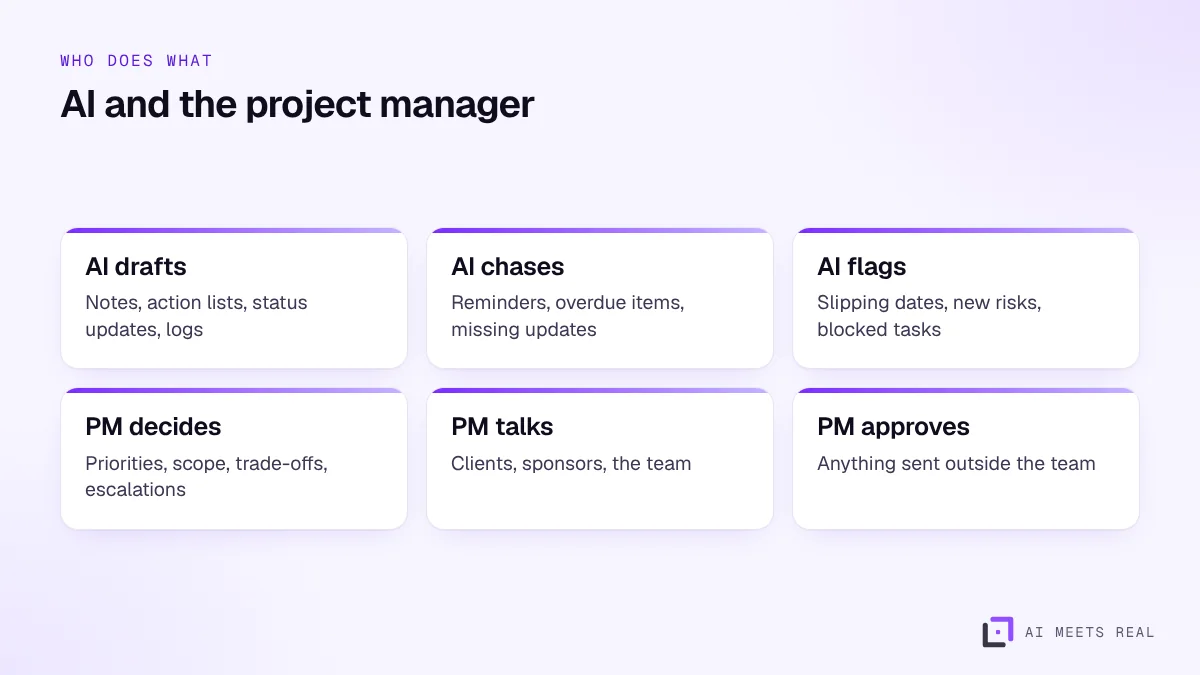
The project manager stays responsible for priorities, trade-offs, client conversations and decisions.
Start with one project and two outputs, usually meeting notes and the weekly status update.
AI helps project managers with the administration that fills their week: capturing meeting notes and actions, chasing task owners, keeping risk and issue logs current and drafting the weekly status update from the project tracker. It works from the tools your team already uses. The project manager stays responsible for priorities, trade-offs, client conversations and decisions, and approves anything that leaves the team.
Why does project admin take so much time?
Project managers sit at the centre of every conversation, and conversations have multiplied. Microsoft's Work Trend Index found the average worker receives 117 emails a day and is interrupted roughly every two minutes during core hours, and that 57% of meetings are ad hoc calls without a calendar invite (Microsoft WorkLab). Atlassian's State of Teams 2025 survey of 12,000 knowledge workers found teams lose about a quarter of their time looking for answers (Atlassian).
For a project manager, that becomes hours each week spent writing notes, asking for updates, rebuilding status reports and searching old threads for what was agreed.
What can AI take over?
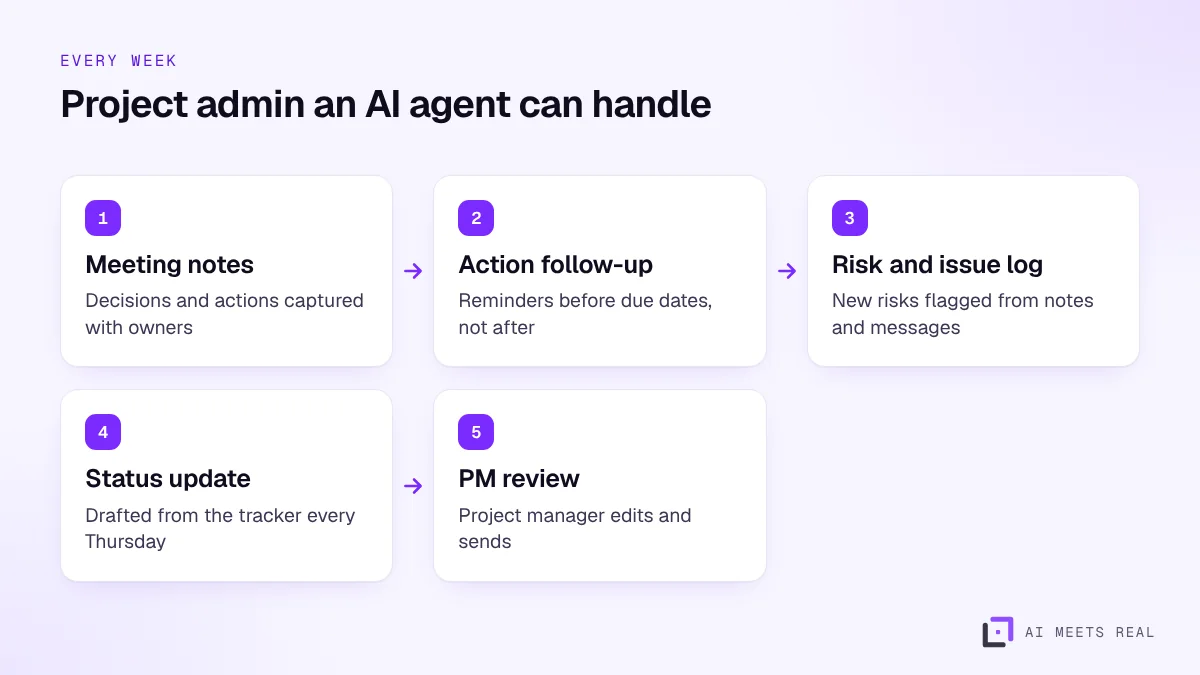
Meeting notes. A summary of each meeting with decisions, actions, owners and due dates, shared within minutes.
Action follow-up. Friendly reminders to owners before items are due, and a list of overdue items for the project manager.
Risk and issue logs. New risks and issues picked up from meeting notes and messages, added to the log for the project manager to confirm.
Status updates. A weekly draft built from the tracker: progress, milestones, risks, decisions needed.
Answers to "where are we?" questions from the team, based on the tracker and the notes.
The project manager reviews drafts instead of writing everything from scratch.
AI agents connect to the tools your team already uses:
Meetings and messages: Microsoft Teams, Outlook, Google Meet and Gmail.
Trackers: Jira, Asana, Monday.com, Smartsheet, Microsoft Project or a shared spreadsheet.
Documents: SharePoint, OneDrive or Google Drive, for specifications and minutes.
If your company already uses Microsoft 365, Copilot covers part of this inside Teams and Outlook; our Copilot guide explains what it does well. An AI agent adds the cross-tool work, such as updating the tracker from meeting notes and drafting the status report.
How does this work on construction and engineering projects?
Construction projects in the UAE have long chains of consultants, contractors and subcontractors, and a lot of correspondence. AI helps with:
Minutes of site and progress meetings, with actions per party.
Tracking requests for information, submittals and their response dates.
Drafting weekly and monthly progress reports from the programme and site updates.
Recording without telling people. Always say a meeting is being recorded and summarised.
Sending AI notes unchecked. A wrong action or owner in the notes causes confusion. The project manager checks before they go out.
Tracker out of date. AI status updates are only as good as the tracker. Keep task status current, or let the agent ask owners for updates.
Too many reminders. Reminders that arrive every day get ignored. Send them before due dates and summarise the rest weekly.
Replacing conversations. An automated update does not replace a call with a worried client.
A worked example
With illustrative numbers: a project manager runs a six-month system rollout with eight workstreams and about 15 meetings a week. Writing notes, chasing actions and building the Thursday status report takes around a day and a half each week.
With an AI agent, notes with decisions and actions go out within minutes of each meeting, owners get reminders two days before their due dates, new risks mentioned in meetings are added to the log for review, and the Thursday report arrives as a draft on Wednesday evening. The project manager spends an hour reviewing and editing instead of a day and a half building. The pilot measures the real time saved.
What is the next step?
Book a 30-minute demo. We will show an AI agent producing meeting notes, chasing actions and drafting a status update on a sample project in your tools. See pricing for setup packages.
Frequently asked questions
Can AI manage a project?
AI can handle much of the administration: notes, action lists, status updates, reminders and logs. Managing the project, meaning setting priorities, making trade-offs and handling people, stays with the project manager.
Which project tools does AI work with?
Most common ones, including Microsoft Teams and Outlook, Jira, Asana, Monday.com, Smartsheet, Microsoft Project and shared spreadsheets, through their APIs or exports.
Is it safe to record and summarise meetings with AI?
Tell participants the meeting is being recorded and summarised, keep recordings in your own systems, set a retention period and limit access. Recordings can contain personal data, so the UAE data protection law applies.
How long does it take to set up?
Meeting notes and weekly status updates for one project can usually be set up within two weeks, using the tools the team already has.