Automated Management Reporting: Weekly KPI Packs Without the Spreadsheet Scramble
By AI Meets Real teamPublished 5 min read
Key takeaways
Most management reports are built by hand from the same sources every week; that work can be automated end to end.
An automated pack has four parts: pulling data from source systems, checking it, writing the commentary and delivering it.
AI is good at the commentary: explaining what changed and why, in plain language, from the numbers.
A named owner reviews and signs off each pack before it goes to leadership.
Automated management reporting means your weekly KPIs and monthly packs build themselves from your source systems, with data checks, charts and written commentary, ready for a named owner to review and send. AI handles the copying, the reconciliation checks and the first draft of the commentary. The owner adds context and signs off. Done well, a report that took a day each week becomes a one-hour review.
Why does reporting take so long?
In most companies the weekly report is built by hand: export from the CRM, export from the accounting system, paste into a spreadsheet, fix the formulas that broke, update the charts and write a summary. It is slow, it depends on one or two people, and it often arrives late or with errors that leadership spots first.
It also competes with everything else. Microsoft's Work Trend Index found workers are interrupted roughly every two minutes during core hours, and 57% of meetings are ad hoc calls without a calendar invite (Microsoft WorkLab). Reporting done in the gaps between interruptions is where mistakes creep in.
What does an automated report pack include?
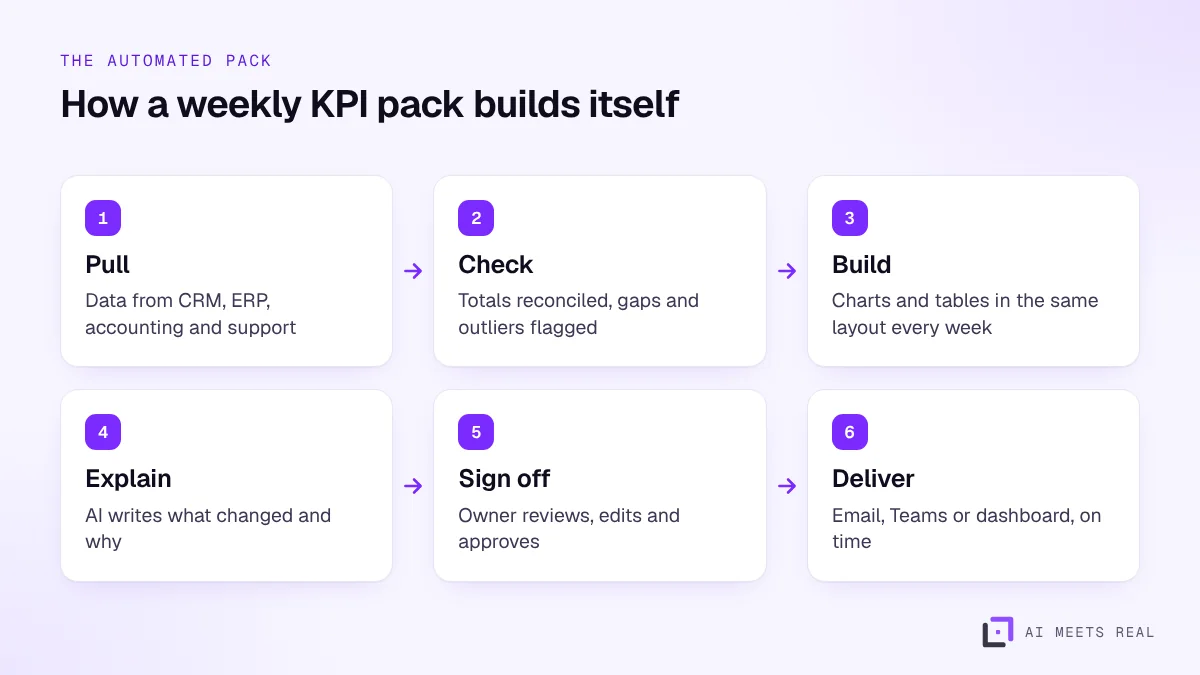
An automated pack has four parts:
Data pull. Scheduled connections to your CRM, ERP, accounting, e-commerce, support and HR systems pull the figures for the period.
Checks. Totals are reconciled against the source of truth, missing data is flagged and unusual movements are highlighted.
Build. Tables and charts are produced in the same layout every week, so readers know where to look.
Commentary and delivery. AI drafts the summary of what changed and why; the owner reviews it and the pack goes out by email, Teams or a dashboard.
The owner reviews a finished draft instead of building the pack from scratch.
AI is good at turning numbers into plain sentences:
"Revenue was AED 1.42m, up 6% on last week, mainly from the Abu Dhabi branch."
"Average support response time rose from 2 to 5 hours; ticket volume was up 40% after the product launch."
"Three deals above AED 200k moved to the proposal stage."
These are example sentences, not real figures. The AI can only explain what is in the data. A person adds what the data cannot show: the context behind a lost client, a planned price change, a market event. That is why every pack has a named owner who signs it off.
How do you make sure the numbers are right?
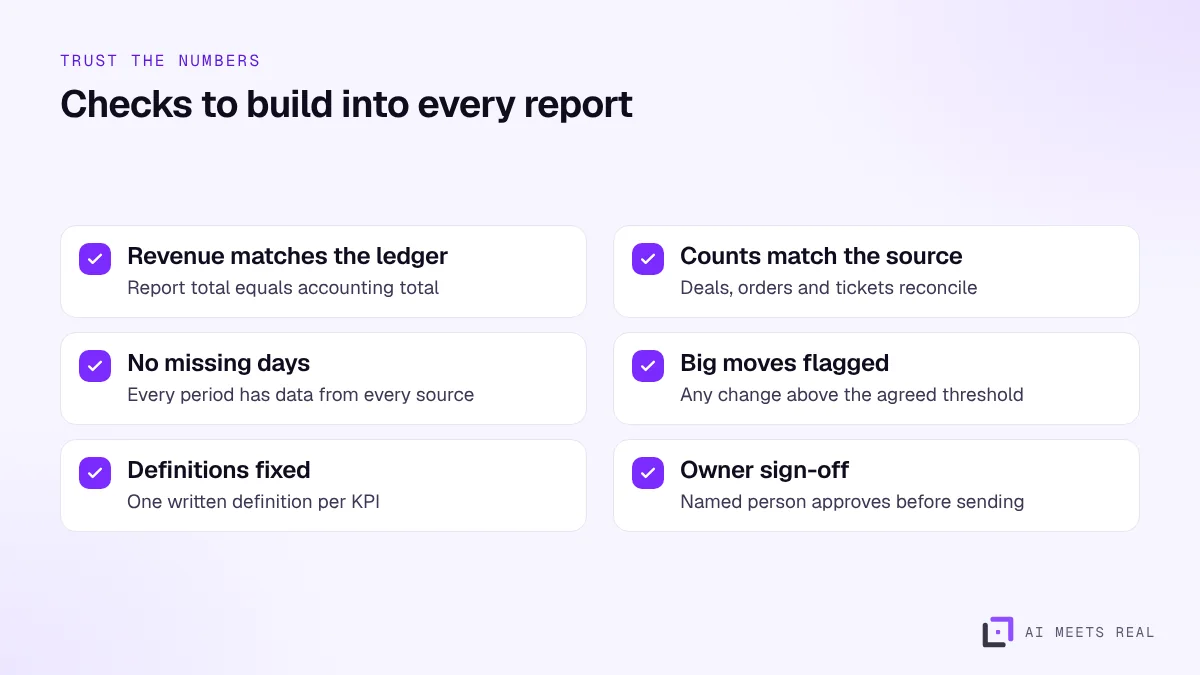
Leadership stops trusting a report after one wrong number. Build checks in from the start:
Checks run automatically; the pack is held back until they pass or the owner overrides with a note.
The most important check is a single written definition for each KPI. "Revenue", "active customer" and "new lead" often mean different things in different teams. Agree them once, write them down, and use the same definition in every report.
Which tools do you need?
Often fewer than you think:
Connections to your source systems, through their APIs or scheduled exports.
A place for the data, which can be a simple database or, for larger companies, a data warehouse.
A reporting layer, such as Power BI, Tableau, Looker Studio or a formatted PDF or email.
An AI model for the commentary, with the numbers passed to it, not raw customer records.
Our guides to Power BI with AI and Tableau cover the dashboard side. For finance packs, our AI for finance page covers month-end and cash reporting. UAE e-invoicing, starting with large businesses in 2027, will also make invoice data cleaner and faster to report on (KPMG).
What should you automate first?
Start with the report that is built most often and read by the most senior people, usually the weekly KPI pack or the monthly management pack. Then:
Write down every figure in the current report and where it comes from.
Agree the definitions and the checks with the report owner.
Build the automated version and run it alongside the manual one for two or three cycles.
Switch over when the numbers match and the owner is comfortable.
A 14-day pilot is usually enough to automate one weekly report from two or three source systems.
How do you measure the benefit?
Hours spent building the report each cycle, before and after.
How often the report is late.
Errors found after the report was sent.
How quickly leadership acts on what the report shows.
The UAE already leads the world in AI adoption, with Microsoft's AI Diffusion Report putting usage at 70.1% of the working-age population in early 2026 (Gulf News). Reporting is one of the simplest places to turn that into saved hours. Our ROI model helps put a value on them.
What mistakes make automated reports fail?
Automating a report nobody reads. Ask leadership which figures they actually use, and drop the rest before you automate.
Unclear definitions. If sales and finance count revenue differently, the automated report will be argued about every week. Agree one definition.
No reconciliation. A report that does not match the accounting system will not be trusted, however good it looks.
Commentary without an owner. AI-written commentary that nobody checks will eventually say something wrong. Keep a named reviewer.
Too many dashboards. One clear weekly pack beats ten dashboards no one opens.
A worked example
With illustrative numbers: a group with four business units sends a weekly KPI pack to its executive committee. Building it takes an analyst most of Monday: exports from the CRM, the ERP and the support system, a spreadsheet with dozens of tabs, and a two-page summary.
Automated, the data is pulled early on Monday morning, the reconciliation checks run, the charts update and a draft summary is written. The analyst reviews the draft, adds two paragraphs of context from conversations with the business units, and sends it before 10am. The analyst's Monday goes back to analysis rather than copying.
What is the next step?
Book a 30-minute demo and bring last week's report with the figures removed. We will show how the same pack builds automatically from your systems, with checks and a draft commentary. See pricing for setup packages.
Frequently asked questions
What is automated management reporting?
Building your regular reports, such as weekly KPIs or the monthly board pack, automatically from your source systems, with checks and written commentary, so the team only reviews and approves instead of building it from scratch.
Can AI write the commentary in a report?
Yes. Given the numbers and last period's figures, AI can explain what changed, flag unusual movements and suggest likely reasons from the data. The report owner checks it and adds context the data cannot show.
Do we need a data warehouse first?
Not always. Many reports can be automated directly from your CRM, ERP and accounting system. A warehouse helps when you have many sources or need history, but it is not a starting requirement.
How do we know the numbers are right?
Build checks into the pack: totals that must match the accounting system, counts that must match the CRM, and alerts when a figure moves more than an agreed amount. The owner signs off only when the checks pass.